7 companies compared
Engineering Drawing Books: What a Textbook Can't Teach You
The best engineering drawing books, such as N.D. Bhatt's, give you many solved examples, but RG Lectures' Engineering Graphics course teaches the projection method first.

By Rahul Jeewani, Founder · Updated 12 Nov 2026
On this page
- 01The shortlist
- 02How we ranked them
- 03The companies in detail
- 04How to choose
- 05Key takeaways
- 06Which engineering drawing book should a first-year student buy?
- 07Why do students struggle with projections even with a good book?
- 08Where do Bhatt's solutions stop, and how do you check your own answer?
- 09What order should you learn in: method first, then your book?
- 10How does our Engineering Graphics course teach the method before you practise?
- 11Method and sources
- 12Frequently asked
The short answer
The RG Lectures Engineering Graphics course is the best starting point. It teaches the projection method first, then gives you numericals and practice sheets, and you can use any textbook alongside it. Pick one textbook by edition, practice volume and CAD content, and check your own drawings with pass or fail tests.
The shortlist
- 1RG Lectures, Engineering Graphics (All Universities) courseOur companyFor learning the projection method first
- 2N.D. Bhatt, Engineering DrawingFor the most worked examples and exercises
- 3R.K. Dhawan, A Textbook of Engineering DrawingFor AICTE-guideline coverage with online model papers
- 4M.B. Shah and B.C. Rana, Engineering DrawingFor a shorter book with solved examples
- 5K. Venkata Reddy, Textbook of Engineering DrawingFor the lowest-priced book here, with AutoCAD
- 6S.N. Lal, Engineering Drawing with an Introduction to AutoCAD: First-angle ProjectionFor first-angle projection as an eBook
- 7K. Rathnam, A First Course in Engineering DrawingFor projections of points, lines, planes and solids
How we ranked them
- Published by the book's own publisher or, for the course, by RG Lectures, so the facts come from a page we can cite
- Covers first-year engineering drawing or graphics
- Lists its edition or validity period
- States its contents, such as pages, chapters or lessons
- Facts checked against the publisher's own page as of November 2026
The companies in detail
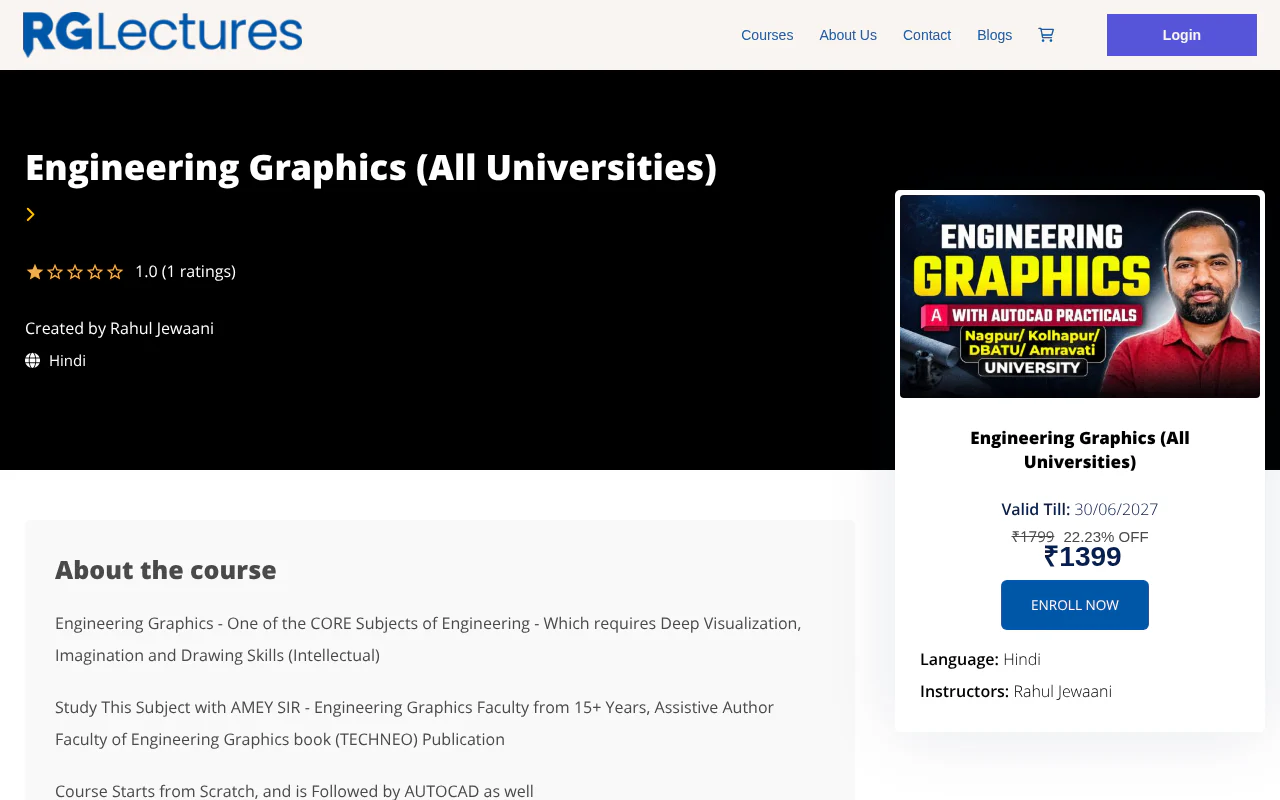
RG Lectures, Engineering Graphics (All Universities) course
Hindi lessons, numericals, AutoCAD practicals and practice sheets
- Publisher
- RG Lectures
- Format
- Course
- Edition or validity
- Valid until 30 June 2027
- Contents
- Theory lectures, numericals, practice sheets, AutoCAD
Our top pick. It teaches the projection method first, starting from foundational concepts, then gives you numericals and practice sheets. You can use any textbook alongside it.
Strengths
- Comprehensive theory lectures in Hindi
- Extensive numerical problems, practice sheets and study materials
- AutoCAD practical training
N.D. Bhatt, Engineering Drawing
Charotar's large textbook with a rewritten CAD chapter
- Publisher
- Charotar
- Format
- Book
- Edition or validity
- 56th edition, 2026
- Contents
- 776 pages, 26 chapters
Bhatt's book gives you a large volume of finished drawings to study. Its publisher lists solutions for only 2 of its 26 chapters.
Strengths
- 523 worked examples, 900 chapter exercises and 1,617 diagrams
- Chapter 26 (CAD) rewritten with 52 practice modules
- 51 animation modules on a web portal
Limitations
- Publisher solutions cover only Chapters 17 and 20, so most exercises have no answer key and you must check your own drawings
- The 523 examples average about 20 per chapter across all 26 chapters, including theory-only ones, so the count is not per topic
R.K. Dhawan, A Textbook of Engineering Drawing
S. Chand textbook with CAD and building drawing sections
- Publisher
- S. Chand
- Format
- Book
- Edition or validity
- 2019 edition
- Contents
- 776 pages, CAD and building drawing sections
Dhawan's book is written to AICTE guidelines and adds CAD and building drawing sections. It comes with 20 model examination papers online.
Strengths
- Written to AICTE guidelines
- Close to 1,300 figures and tables, about 600 end-of-chapter problems
- 20 model examination papers online
Limitations
- It is a 2019 edition, so check its contents list against your syllabus
- Like any textbook it shows finished drawings, so the method must come from elsewhere
M.B. Shah and B.C. Rana, Engineering Drawing
Pearson's 580-page second edition
- Publisher
- Pearson
- Format
- Book
- Edition or validity
- 2nd edition, 2009
- Contents
- 580 pages, over 300 solved examples and exercises
A shorter book with over 300 solved examples and exercises. Its AutoCAD content is as of the 2009 edition.
Strengths
- 580 pages
- Over 300 solved examples and exercises
- Includes AutoCAD content
Limitations
- It is a 2009 edition, so check its contents list against your syllabus
- At ₹825 it costs more than the 56th-edition Bhatt at ₹720
K. Venkata Reddy, Textbook of Engineering Drawing
BS Publications textbook following the SP 46 drawing code
- Publisher
- BS Publications
- Format
- Book
- Edition or validity
- 4th edition, 2009
- Contents
- 483 pages, AutoCAD included
The cheapest book on the list and it includes AutoCAD. It follows the 2003 edition of the Bureau of Indian Standards drawing code, SP 46.
Strengths
- ₹395, the lowest price on the list
- 483 pages
- AutoCAD included
Limitations
- It is a 2009 edition
- Its standards follow the 2003 edition of SP 46
S.N. Lal, Engineering Drawing with an Introduction to AutoCAD: First-angle Projection
Cengage eBook with step-by-step solved problems
- Publisher
- Cengage
- Format
- eBook
- Edition or validity
- 1st edition, 2018
- Contents
- 18 chapters, AutoCAD 2000 for 2D drawings
An eBook with step-by-step solved problems and BIS standards throughout. Its AutoCAD coverage is AutoCAD 2000 for 2D drawings.
Strengths
- 18 chapters with step-by-step solved problems
- BIS standards throughout
- ₹360
Limitations
- AutoCAD coverage is of AutoCAD 2000, for 2D drawings only
- It is an eBook, not a printed book
K. Rathnam, A First Course in Engineering Drawing
Springer's 16-chapter introduction
- Publisher
- Springer
- Format
- Book
- Edition or validity
- 2017 edition
- Contents
- 387 pages, 16 chapters
A compact first course covering projections of points, lines, plane figures and solids, auxiliary projections and isometric projections.
Strengths
- 387 pages in 16 chapters
- Covers projections of points, lines, plane figures and solids
- Includes auxiliary and isometric projections
Limitations
- It is a 2017 edition
- Check its contents list against your syllabus before you buy
How to choose
- 1
Match the book to your syllabus
Check each book's contents list against your syllabus before you buy. - 2
Check the edition
Compare editions: Bhatt is the 56th edition (2026), while Shah and Rana and Venkata Reddy are 2009 editions. - 3
Check the standards
Venkata Reddy follows the 2003 edition of the Bureau of Indian Standards drawing code, SP 46, and Lal states BIS standards throughout. - 4
Check the CAD content
Look at which AutoCAD version a book covers, such as AutoCAD 2000 in Lal's eBook, if you need AutoCAD. - 5
Look at the answer key
Bhatt's publisher lists solutions for only Chapters 17 and 20 of 26, so plan checks you can run on your own drawings. - 6
Compare price against the MRP
Compare the listed price with the maximum retail price, such as ₹720 against ₹800 for Bhatt and ₹600 against ₹750 for Dhawan.
Key takeaways
- Pick a textbook from the list below by edition, by the practice it gives you and by whether you need AutoCAD, and then stay with it.
- Orthographic and isometric views carry a large share of the SPPU first-year marks. Learn the method for them before you grind through a book's exercises.
- Bhatt's publisher lists solutions for only 2 of the book's 26 chapters, so you need checks you can run on your own drawings.
- The RG Lectures Engineering Graphics course is the best starting point. It teaches the method first, then gives you numericals and practice sheets, and you can use any textbook alongside it.
Which engineering drawing book should a first-year student buy?
Start with the RG Lectures Engineering Graphics (All Universities) course, our top pick. The books are secondary options, compared by edition, practice volume and CAD (computer-aided drafting) content.
Figures are from each publisher's own page, as of November 2026, and the course row is from our own course page. Check each book's contents list against your syllabus before you buy.
Our calculation: 523 ÷ 26 ≈ 20 worked examples per chapter for Bhatt. That is an average across every chapter, including theory-only ones, so it is not a per-topic count.
- Option
- RG Lectures, Engineering Graphics (All Universities) course (top pick)
- Edition and price
- ₹1,399, against a maximum retail price (MRP) of ₹1,799, as of November 2026. Valid until 30 June 2027
- Contents and CAD
- Comprehensive theory lectures in Hindi, extensive numerical problems, practice sheets and study materials, starting from foundational concepts. AutoCAD (drafting software) practical training
- Option
- N.D. Bhatt, Engineering Drawing (Charotar)
- Edition and price
- 56th edition, 2026. ₹720, listed down from ₹800
- Contents and CAD
- 776 pages, 26 chapters, 523 worked examples, 900 chapter exercises, 1,617 diagrams. Chapter 26 (CAD) rewritten with 52 practice modules, plus 51 animation modules on a web portal
- Option
- R.K. Dhawan, A Textbook of Engineering Drawing (S. Chand)
- Edition and price
- 2019 edition. ₹750 MRP, listed at ₹600
- Contents and CAD
- 776 pages, written to AICTE guidelines, close to 1,300 figures and tables, about 600 end-of-chapter problems, 20 model examination papers online. Sections on CAD and building drawing
- Option
- M.B. Shah and B.C. Rana, Engineering Drawing (Pearson)
- Edition and price
- 2nd edition, 2009. ₹825
- Contents and CAD
- 580 pages, over 300 solved examples and exercises. AutoCAD content as of the 2009 edition
- Option
- K. Venkata Reddy, Textbook of Engineering Drawing (BS Publications)
- Edition and price
- 4th edition, 2009. ₹395
- Contents and CAD
- 483 pages, written to the 2003 edition of the Bureau of Indian Standards drawing code, SP 46. AutoCAD included
- Option
- S.N. Lal, Engineering Drawing with an Introduction to AutoCAD: First-angle Projection (Cengage)
- Edition and price
- eBook, 1st edition, 2018. ₹360
- Contents and CAD
- 18 chapters, step-by-step solved problems, BIS standards throughout. AutoCAD 2000 for 2D drawings
- Option
- K. Rathnam, A First Course in Engineering Drawing (Springer)
- Edition and price
- 2017 edition
- Contents and CAD
- 387 pages, 16 chapters, including projections of points, lines, plane figures and solids, auxiliary projections and isometric projections
Why do students struggle with projections even with a good book?
Projections are hard because a book shows the finished drawing, while the skill is the sequence of decisions that produced it. Spatial visualisation, orthographic projection and isometric views are among the hardest areas listed in a 2024 study of engineering students' drawing difficulties. The study does not report its sample size, so read it as an indication of difficulty, not a measure.
Our view is that a solved example hides three things. It does not show which way you were looking, which line you drew first, or how you caught a mistake.
The marks make this matter. Our breakdown of the SPPU first-year Engineering Graphics end-semester paper (70 marks, 2024 pattern) puts orthographic projection at 16 marks, isometric at 16, lines at 12, planes at 12 and curves and development at 14. So orthographic and isometric together are 32 of 70, or 45.7%, as set out on our marks page.
Placement is the first place to lose marks. Under first angle projection, which our first angle vs third angle page gives as the SPPU rule, the object sits between you and the plane. Each view lands on the side opposite the direction you looked from. So ask one question before every view: which way did I look from? Then place the view opposite.
Where do Bhatt's solutions stop, and how do you check your own answer?
The publisher provides solutions for Chapter 17 (Isometric Projection) and Chapter 20 (Conversion of Views) only, out of 26 chapters. So for most exercises you have no answer key, and you need checks you can run yourself.
Because the publisher supplies solutions for only two chapters, most students will need to check their own work. Free PDFs of a current textbook are usually unlicensed and may not match your syllabus, so we do not link them.
Use these pass or fail checks on every drawing instead.
How do you check view alignment in first angle projection?
Pass: the top view sits directly below the front view, the right-side view sits to its left, and projector lines run straight across. Fail: a feature does not line up across views.
How do you check that dimensions match across views?
Pass: width matches between the front and top views, and height matches between the front and side views. Fail: any measurement differs between two views.
How do you check hidden features?
Pass: every edge you cannot see from that direction is dashed, and a continuous line wins where the two coincide. Fail: a hidden edge is drawn continuous or is missing.
How do you check the projection symbol?
Pass: the first angle symbol has its circles on the right. Fail: the circles are on the left, which means third angle.
How do you check isometric size?
Pass: lengths along the axes are full size, unless the question asks for the isometric scale of 0.8165. Fail: scale is mixed within one drawing.
How do you check slanted lines and circles in an isometric view?
Pass: slanted lines are plotted from their end points inside a box, and circles are drawn by the four-centre method touching the midpoint of each rhombus side. Fail: slanted lines are measured directly, or the curve misses a rhombus midpoint.
The full versions are on our orthographic projection and isometric projection pages, where 0.8165 is explained as the square root of 2/3.
What order should you learn in: method first, then your book?
Learn the method for one topic, redraw a solved example from memory, attempt one unsolved exercise, then run the checks above. This is our recommendation, and it works with any of the books above.
- Learn the method. Watch or read one topic being built step by step. Pass: you can say what you look at first and which view you draw first.
- Redraw one solved example from memory. Close the book. Pass: your drawing matches the book's with every view aligned. Fail: you needed to peek at the answer.
- Attempt one unsolved exercise. Pass: you finish without opening the solved example.
- Run the checks. Spend about ten minutes on them after each exercise. Pass: every check above holds.
Then decide what to do next:
- Where you are
- You follow solved examples but fail the checks on unsolved ones
- What we would do
- A method gap. Add a lesson-led course for that topic
- Where you are
- You cannot start a view
- What we would do
- Go back to step 1 before touching exercises
How does our Engineering Graphics course teach the method before you practise?
Our Engineering Graphics course teaches in structured lessons in Hindi, starting from foundational concepts, and has numericals and practice sheets to use before your textbook's exercises. It suits students from any engineering university.
The course by Rahul Jewaani (RG Sir, our founder) has comprehensive theory lectures, extensive numerical problems, AutoCAD practical training, practice sheets and study materials. As of November 2026 it costs ₹1,399, against a listed MRP of ₹1,799, and it is valid until 30 June 2027. The price is also set out on our course cost page.
Our suggestion is to treat the course's practice sheets as your first unsolved problems, then move to your book's exercises with the checks above. If you want to start, open the Engineering Graphics (All Universities) course.
How we built this list
We considered the RG Lectures Engineering Graphics course and six common engineering drawing books, and took each fact from the publisher's own page or, for the course, our own course page. A title was included only if its page gave its edition and contents. We ranked the RG Lectures course first as our recommended starting point and listed the books after it. Figures are as of November 2026, and RG Lectures, which publishes this page, is one of the companies listed.
This page is published by Rg lectures. If anything here is out of date, tell us and we will correct it.
Sources
- 1.Engineering Drawing by N.D. Bhatt, 56th edition, Charotar Publishing House, November 2026
- 2.A Textbook of Engineering Drawing, R.K. Dhawan, S. Chand Publishing, November 2026
- 3.Engineering Drawing, 2/e, M.B. Shah and B.C. Rana, Pearson Education India, November 2026
- 4.Textbook of Engineering Drawing, K. Venkata Reddy, 4th edition, BS Publications, November 2026
- 5.Engineering Drawing with an Introduction to AutoCAD: First-angle Projection, S.N. Lal, Cengage India, November 2026
- 6.A First Course in Engineering Drawing, K. Rathnam, Springer, November 2026
- 7.Study of the Difficulties and Challenges Faced by Engineering Students in Engineering Drawing, Rathore and Gadge, IJRASET, 2024
- 8.Engineering Graphics (All Universities) course page, RG Lectures, November 2026